Table of contents
Open Table of contents
TS 认识
安装 TypeScript 编译环境
# 安装命令
npm install typescript -g
# 查看版本
tsc --version
ts 的运行环境
-
方式一:通过
webpack,配置本地的 TypeScript 编译环境和开启一个本地服务,可以直接运行在浏览器上。- 通过 webpack 配置 ts 运行环境可参考 coderwhy 文章:https://mp.weixin.qq.com/s/wnL1l-ERjTDykWM76l4Ajw
-
方式二:通过
ts-node库,为 TypeScript 的运行提供执行环境;- 安装 ts-node
npm install ts-node -g- 另外 ts-node 需要依赖
tslib和@types/node两个包:
npm install tslib @types/node -g- 直接通过
ts-node来运行 TypeScript 的代码:
ts-node demo.tsjs 类型使用
ts 常用类型约束和类型推导
// 简单数据类型会被默认推导,不声明 string 也会推导为 string 类型
let message: string = 'Hello World';
// Type 'nunmber' is not assignable to type 'string';
message = 123;

let arr: Array<string> = ['a', 'b', 'c'];
// or 与上一种声明一样
arr: string[] = ['a', 'b', 'c']

let num: number = 123;

let flag: boolean = true;

// 不推荐此种声明方式,原因是取值或赋值时 obj.name 会报类型错误
let obj: object = { name: "张三", age: 18 }
// 定义 object 类型需明确声明 object 内部的属性类型,或者让其自动进行类型推导
let obj: { name: string; age: number } = { name: "张三", age: 18 };

let n: null = null;
let u: undefined = undefined;
复杂类型的无法推导,自动识别为 any 类型
定义 ts 函数的参数类型和返回值类型
// 简单参数类型
function foo(str: string, num: number): string {
  return str + num;
}

// 约束参数为 对象类型参数
function foo(params: { name: string; age: number }) {
  // ...
}
// or
type Params = {
  // ? 代表该参数是可选类型
  name?: string;
  age: number;
};
function foo(params: Params) {
  // ...
}
ts 数据类型
any类型:实无法确定一个变量的类型,可用 any 类型,相当于操作 jsunknown类型:unknown是 TypeScript 中比较特殊的一种类型,它用于描述类型不确定的变量。- 和
any类型有点类似,但是unknown类型的值上做任何事情都是不合法的,而any类型上做任何操作都是合法的
- 和
let a: unknown = "张三";
a = 123;

// unknown 类型默认情况下做任意操作都是非法的
// 要求必须进行类型的校验(缩小),才能根据缩小后的类型,进行对应类型的操作
if (typeof a == "string") {
  console.log(a.length, a.split(""));
}void类型: 一个函数是没有返回值的,那么它的返回值就是 void 类型
function foo(str: string): void {
  console.log(str);
  // void 类型 也可以返回 undefined
  // return undefined
}

// foo 函数本身的类型被推导为 (str: string) => voidnever类型:表示永远不会发生值的类型,比如一个函数- 一个函数中是一个死循环或者抛出一个异常,那么这个函数不会返回东西
- 此时写 void 类型或者其他类型作为返回值类型都不合适,就可以使用 never 类型
// 实际开发中只有进行类型推导时,才会自动推导出 never 类型,很少使用
// 死循环
function foo(): never {
  throw new Error("error");
}

// 推导出的返回值
// 推导出的是 never[]
function foo() {
  return [];
}

// 定义开发工具类做严格校验时,可能会用到 never
function handleMsg(msg: string | number | boolean) {
  switch (typeof msg) {
    case "string":
      console.log(msg.length);
      break;
    case "number":
      console.log(msg);
      break;
    case "boolean":
      console.log(Number(msg));
      break;
    // 如果后续在参数中传入新的类型,却没有做 case 校验,never 就会提示错误
    default:
      const check: never = msg;
  }
}tuple类型:tuple是元组类型,很多语言中也有这种数据类型,比如 Python、Swift 等
const info: any[] = ["张三", 18, "男"];
const name = info[0]; // 不能明确知道是何种数据类型

// 元祖类型允许存放不同的数据类型
const info: [string, number, string] = ["张三", 18, "男"];
const name = info[0]; // 可以推导出 name 为 string类型
const age = info[1]; // 可以推导出 age 为 number类型

// 元组应用 ,例如 react 的 useState,数组第一项为值,第二项为 function
const [count, setCount] = useState(10);
function useState<T>(state: T): [t, (newState: T) => void] {
  let currentState = state;
  const setState = (newState: T) => {
    currentState = newState;
  };
  return [currentState, setState];
}
ts 常用语法
ts 类型语法
联合类型(|)
一个参数可能有多个类型组成
function foo(str: string | number) {
  // 可以根据类型缩小,确定更加准确的数据类型
  if (typeof str === "string") {
    str.split(",");
  } else {
    str *= str;
  }
}
类型别名(type)/接口声明(interface)
// type 或者 interface 都可以
// 类型别名和接口非常相似,在定义对象类型时,大部分时候,你可以任意选择使用
type Person = {
  name: string;
  age: number;
  sex?: "男" | "女";
};
interface Person {
  name: string;
  age: number;
  sex?: "男" | "女";
}
function foo(person: Person) {
  // ...
}
interface 和 type 区别
- 如果是定义非对象类型,通常推荐使用 type
type a = string | number;
// interface 无法定义基本类型
interface a {
  // ...
}- 如果是定义对象类型,那么他们是有区别的
- type 不能存在两个相同名称的别名,interface 可以
interface Person {
  name: string;
}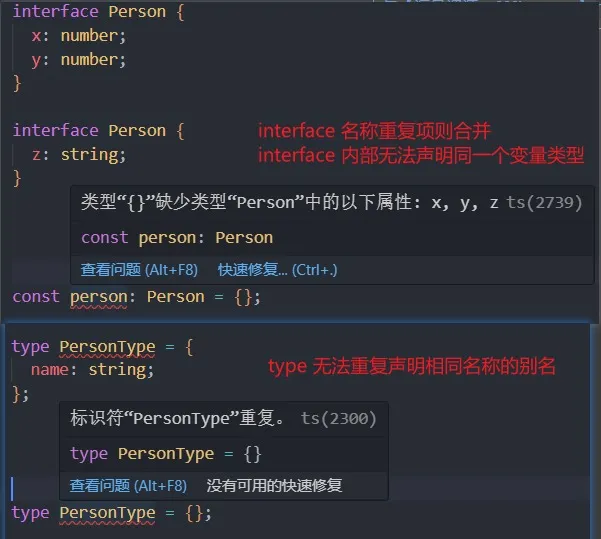
type 的使用类型更广,非对象类型推荐使用 type,interface 只能用来声明对象
联合类型(&)
- 交叉类型标识需要满足多个类型的条件
- 交叉类型使用 & 符号
- 没有同时满足是一个 number 又是一个 string 的值,所以该类型其实是
never
// 交叉类型
type Align = "left" | "right" | "center";
type MyType = number & string; // 无意义的

// 联合类型应用
type Coder = {
  name: string;
  code: () => void;
};
type Loser = {
  name: string;
  job: string;
  introduce: () => viod;
};

// 同时满足 coder 和 loser 的类型
const person: Coder & Loser = {
  name: "张三",
  job: "敲代码",
  code: function () {
    console.log("code function");
  },
  introduce: function () {
    console.log("I am a loser");
  },
};
基本类型同时满足是没有意义的,因为不可能实现,但对象类型是可以多条件类型满足的
类型断言(as)
- 有时候 TypeScript 无法获取具体的类型信息,这个我们需要使用类型断言
- TypeScript 只允许类型断言转换为 更具体 或者 不太具体 的类型版本,此规则可防止不可能的强制转换
// 根据class类型只能推断是 Element,如果明确知道具体类型,可以使用 as 进行类型缩小
const imgEle = document.querySelector(".img") as HTMLImageElement;
imgEle.src = "xxx";
imgEle.alt = "xxx";

// 类型断言只能断言成更加具体哦类型,或者 不太具体(any/unknown)类型
const age: number = 20;
// ts 不被允许,是错误的
// const age = age as string;

// 对 TS 类型检测是正确的,但代码本身不太正确
const age2 = age as any;
const age3 = age2 as string;
console.log(age3.split(""));
非空类型断言(!)
强制性确定某个标识符是有值的,跳过 ts 在编译阶段对它的检测;
type Person = {
  name: string;
  friends?: {
    name: string;
    age: number;
  };
};
const person: Person = {
  name: "张三",
};

// ts提示:赋值表达式的左侧不能是可选属性访问。
person.friends?.name = "李四";
// 可以使用类型缩小 if,也可以使用非空类型断言
person.friends!.name = "李四";
字面量类型
- 常用于将多个字面量类型联合起来,类似枚举
type Direction = "left" | "right" | "bottom" | "left";
// 该变量为类型中的其中一个
const direction: Direction = "right";- 字面量推理
type MethodType = 'get' | 'post';
function request(url: string, method: MethodType) {
  // ...
}
const req = {
  url: 'http://xxx',
  method: 'post',
} as const;

// ts 提示:类型“string”的参数不能赋给类型“MethodType”的参数。
// ts类型推导只能推导出 method 是 string
request(req.url, req.method);

// 1、使用 as
request(req.url, req.method as MethodType);
// 2、使用字面量,明确 req 的类型 req:{url: string,method: "post"}
// 3、 as const 直接将 req 转化为只读字面量
const req = {
  url: 'http://xxx',
  method: 'post',
} as const;
/** 此时 req 的类型
const req: {
    readonly url: "http://xxx";
    readonly method: "post";
}
/
类型缩小/类型收窄
- typeof
- 平等缩小(比如===、!==)
- instanceof
- in
// typeof
type ID = number | string;
function getID(id: ID) {
  if (typeof id === "string") id.split(",");
  else id.toFixed(2);
}

// 平等缩小
type Align = "left" | "right" | "center";
function getAlign(align: Align) {
  switch (align) {
    case "left":
      console.log("调用left的逻辑");
      break;
    case "right":
      console.log("调用left的逻辑");
      break;
    case "center":
      console.log("调用left的逻辑");
      break;
    default:
      console.log("不确定的参数逻辑");
      break;
  }
}

// instanceof
function formatDate(pubDate: Date | string) {
  if (date instanceof Date) return Date.toString();
  else return date;
}

// in
type Cat = { mouse: () => void };
type Dog = { watchHome: () => void };
function getAnimal(animal: Cat | Dog) {
  if ("mouse" in animal) animal.mouse();
  else animal.watchHome();
}
ts 函数类型
type CalcFunc = (num1: number, num2: number) => void;

function calc(fn: CalcFunc) {
  fn(20, 30);
}

function sum(num1: number, num2: number) {
  return num1 + num2;
}
函数类型解析
ts 对于传入的函数的参数个数过多的是不检测的
type CalcFunc = (num1: number, num2: number) => void;
function calc(fn: CalcFunc) {
  fn(20, 30);
}

// 规定的类型有两个参数,返回值为 void,传入 0 个返回值为 number,不报错
calc(function () {
  return 123;
});

// ts 对于很多类型的检测不报错,取决于内部规则
// 例子:
interface Person {
  name: string;
  age: number;
}
// 直接赋值报错
// const info: Person = {
//   name: '张三',
//   age: 18,
//   sex: '男',
// };
const p = {
  name: "张三",
  age: 18,
  sex: "男",
};
// 不报错
const info: Person = p;
调用签名
- 函数类型表达式并不能支持声明属性,如果只是声明函数类型本身,使用函数类型表达式
- 如果想描述一个带有属性的函数,既可以作为函数被调用,也有其它属性时,使用调用签名
// 1、函数类型表达式

/* type FooType = (num: number) => number;
const foo: FooType = (num: number) => {
  return num;
};
 */

// 2、函数的调用签名(从对象的角度来看待这个函数,也可以有其他属性)
interface Foo {
  name: string;
  age: number;
  // 声明了调用签名,此时就可以调用这个函数
  // 函数类型是 =>  函数调用签名是 :
  (num: number): number;
}
const foo: Foo = (num: number): number => {
  return num;
};

foo.name = "张三";
foo.age = 18;
// 此表达式不可调用。
// 类型 "Foo" 没有调用签名。
foo(3);
构造签名
调用签名是通过函数声明的形式来定义函数类型构造签名是通过new关键字 的形式来定义函数
class Person {
  name: string;
  constructor(name: string) {
    this.name = name;
  }
}

interface IPerson {
  // 调用签名没有前边的 new
  // 相当于声明,该函数被 new 实例化出来的函数是一个 Person 类
  new (name: string): Person;
}

function factory(ctor: IPerson) {
  return new ctor("张三");
}
参数的可选类型
可选参数的类型是有一个 undefined 类型的
// y 的类型是联合类型 number | undefined
function foo(x: number, y?: number) {
  // ...
}

// 可选参数可以赋默认值,且有默认值时,可以省略类型声明
function foo(x: number, y: number = 10) {
  // ...
}
剩余参数
从 ES6 开始,JavaScript 也支持剩余参数,剩余参数语法允许我们将一个不定数量的参数放到一个数组中
// 可以传入数量不等的参数
function sum(...args: (string | number)[]) {
  let total = 0;
  for (const item of args) {
    total += item;
  }
  return total;
}
函数的重载(了解)
在 TypeScript 中,如编写了一个add函数,希望可以对字符串和数字类型进行相加,但实际操作是不被允许的,此时可以使用 函数重载
- 在 TypeScript 中,我们可以去编写不同的重载签名(overload signatures)来表示函数,可以以不同的方式进行调用
- 一般是编写两个或者以上的重载签名,再去编写一个通用的函数以及实现
function sum(x: number | string, y: number | string): number | string {
  // TS 提示:运算符“+”不能应用于类型“string | number”和“string | number”。
  // 可以使用类型缩小,但是会产生多余逻辑判断
  return x + y;
}

// TypeScript 中函数的重载写法
// 1、先编写重载签名
function sum(x: number, y: number): number;
function sum(x: string, y: string): string;

// 2、编写通用的函数实现
function sum(x: any, y: any): any {
  return x + y;
}

sum(1, 2);
sum("a", "b");
// 没有与此调用匹配的重载。
// sum({ name: "a" }, null);
函数重载与 JAVA 的注解
@Override有点类似,但没有重写功能
联合类型和函数重载
定义一个函数,可以传入字符串或者数组,获取它们的长度。
- 方案一:使用联合类型来实现;
- 方案二:实现函数重载来实现;
// 联合类型
function getLength(arg: string | any[]) {
  return a.length;
}

// 函数重载
function getLength(arg: string): number;
function getLength(arg: any[]): number;
function getLength(arg: any) {
  return a.length;
}在可能的情况下,尽量选择使用联合类型来实现
ts 可推导的 this 类型
函数中默认 this 类型
在没有对 TS 进行特殊配置的情况下,this 是 any 类型
// 1、对象中的函数中的 this
const obj = {
  name: "张三",
  job: function () {
    // 默认情况下,在没有指定的情况下,this 为 any
    console.log(this.name.length, "coding");
  },
};

obj.job();
// 此时如果手动绑定 this 为 {},那么 job 函数调用就会报错
obj.job.call({});

// 2、普通的函数
function foo() {
  // any
  console.log(this);
}
ts 的编译配置
- 在文件根目录下执行
tsc --init,生成tsconfig.json - 在设置了
noImplicitThis为 true 时, TypeScript 会根据上下文推导 this,但是在不能正确推导时,就会报错,需要明确的指定 this。
// 开启后,该函数的 this 报错
// "this" 隐式具有类型 "any",因为它没有类型注释。
function foo() {
  console.log(this);
}

// 报错问题解决
// 第一个为绑定的this,参数名必须为 this,第二个是传递的参数
function foo(this: { name: string }, info: { name: string }) {
  console.log(this, info);
}

// foo 函数指定 this 指向
foo.call({ name: "张三" }, { name: "李四" });
手动指定 this 指向的方式并不推荐
this 相关的内置工具
Typescript 提供了一些工具类型来辅助进行常见的类型转换,这些类型全局可用。
ThisParameterType- 用于提取一个函数类型 Typ e 的 this 参数类型
- 如果这个函数类型没有 this 参数返回 unknown
OmitThisParameter- 用于移除一个函数类型 Type 的 this 参数类型, 并且返回当前的函数类型
function foo(this: { name: string }, info: { name: string }) {
  console.log(this, info);
}

type FooType = typeof foo;

// 只获取 FooType 类型中 this 的类型
type FooThisType = ThisParameterType<FooType>;

// 删除 this 参数类型,只留下参数类型和函数的返回类型
// 比 ThisParameterType 更实用
type PureFooType = OmitThisParameter<FooType>;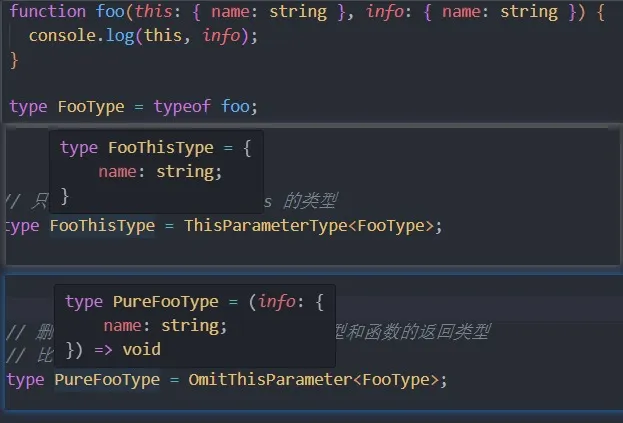
ThisType
这个类型不返回一个转换过的类型,它被用作标记一个上下文的 this 类型。(官方文档原话看不懂)
interface IState {
  name: string;
  age?: number;
}
interface IStore {
  state: IState;
  coding?: () => void;
}

const store: IStore & ThisType<IState> = {
  state: {
    name: "张三",
  },
  coding() {
    // 正常访问需要 .state.name
    // console.log(this.state.name);

    // 将 this指向绑定到 state 上,此时逻辑可以通,但是 TS 不识别
    // 使用 ThisType 给store中的所有函数都指定 this 类型为 state 的类型
    console.log(this.name);
  },
};

store.coding?.call(store.state);
正常手动给函数或对象内绑定的 this,TS 是不识别的,而
ThisType就是给上下文绑定 this 使用的