Table of contents
Open Table of contents
需求背景
已有的系统中,已在前端做了单条数据的打印功能,使用的是 react-to-print,但是用户觉得一个一个打印比较麻烦(主要是想汇集材料留档),因此想要一个批量打印 PDF 的功能,但是前端没法做(原因会在下方说明),因此就更换到后端来实现了,还好 iText 救我狗命(doge)
最初尝试在前端实现此功能,但是效果不理想,html2canvas + jspdf 打印出来的效果很不好,样式与原 html 样式有差距不说,大图片的挂载更是一个严重的问题,根本无法实现大批量导出。有兴趣的可以尝试一下,反正我折腾了很久最终还是放弃了,目前后端导出的 PDF 样式与前端使用 react-to-print 导出的效果基本一致。
功能内容
该文章中实现的的主要功能如下,可以直接拷贝使用:
- 自定义导出字体(微软雅黑)
- 使用 Thymeleaf 自定义渲染内容
- PDF 批量打印
- 导出 zip 文件
- 前端接收并显示已接收大小
最新的 iText 相比 iText5 的 PDF 渲染速度要快非常多(从最开始用 5 换到最新的,导出速度提高了最少 5 倍),而且对 css 样式的可使用性有明显提高,flex 布局可以正常使用,开发体验已经很棒了
吐槽:iText 本身渲染 PDF 的写法跟坨屎一样,
new Paragraph("Hello Word")这种也就写一些简单的内容了,复杂一点的能把人累死
后端 PDF 渲染导出
先添加相关依赖
  <dependency>
      <groupId>org.springframework.boot</groupId>
      <artifactId>spring-boot-starter-thymeleaf</artifactId>
  </dependency>
  <!-- thymeleaf 需要这个包, 否则转 html 时会报错 -->
  <dependency>
      <groupId>ognl</groupId>
      <artifactId>ognl</artifactId>
      <version>3.1.26</version>
  </dependency>
  <!-- 核心 将 Tymeleaf 渲染成 PDF -->
  <dependency>
      <groupId>com.itextpdf</groupId>
      <artifactId>html2pdf</artifactId>
      <version>6.2.0</version>
  </dependency>
导出的 PdfUtil 类
这里注册了微软雅黑的默认字体和粗体,如果没有粗体要求的可以不导入。
windows 系统字体统一都在 C:\Windows\Fonts 下,这里将字体拷贝到了 resources 目录下
目前只用到了 convertHtmlToPdfByte 这个方法
import com.itextpdf.html2pdf.ConverterProperties;
import com.itextpdf.html2pdf.HtmlConverter;
import com.itextpdf.io.font.FontProgram;
import com.itextpdf.io.font.TrueTypeCollection;
import com.itextpdf.kernel.geom.PageSize;
import com.itextpdf.kernel.pdf.PdfDocument;
import com.itextpdf.kernel.pdf.PdfWriter;
import com.itextpdf.layout.font.FontProvider;
import lombok.extern.slf4j.Slf4j;

import java.io.*;
import java.nio.file.Files;

@Slf4j
public class PdfExportUtil {
    // 微软雅黑字体文件路径
    private static final String FONT_PATH = "fonts/msyh.ttc";
    private static final String FONT_BOLD_PATH = "fonts/msyhbd.ttc";
    private static FontProvider FONT_PROVIDER;

    /**
     * 初始化字体提供器
     */
    private static synchronized void initFontProvider() {
        if (FONT_PROVIDER != null) return;

        try {
            FontProvider provider = new FontProvider();
            registerMsyhFont(provider);
            FONT_PROVIDER = provider;
        } catch (Exception e) {
            log.error("字体初始化失败", e);
            // 回退到系统字体
            FONT_PROVIDER = new FontProvider();
            FONT_PROVIDER.addSystemFonts();
        }
    }

    /**
     * 注册微软雅黑字体
     */
    private static void registerMsyhFont(FontProvider provider) throws Exception {
        // 注册常规字体 (msyh.ttc)
        try (InputStream regularIs = PdfExportUtil.class.getClassLoader().getResourceAsStream(FONT_PATH)) {
            TrueTypeCollection regularTtc = new TrueTypeCollection(regularIs.readAllBytes());
            FontProgram regularProgram = regularTtc.getFontByTccIndex(0);
            provider.addFont(regularProgram);
        }

        // 注册粗体字体 (msyhbd.ttc)
        try (InputStream boldIs = PdfExportUtil.class.getClassLoader().getResourceAsStream(FONT_BOLD_PATH)) {
            byte[] boldData = boldIs.readAllBytes();
            TrueTypeCollection boldTtc = new TrueTypeCollection(boldData);
            FontProgram boldProgram = boldTtc.getFontByTccIndex(0);
            provider.addFont(boldProgram);
        }

        log.info("微软雅黑字体注册成功");
    }

    private static ConverterProperties createConverterProperties() {
        ConverterProperties properties = new ConverterProperties();
        // 初始化字体
        if (FONT_PROVIDER == null) {
            initFontProvider();
        }

        properties.setFontProvider(FONT_PROVIDER);
        return properties;
    }

    /**
     * 将HTML内容转换为PDF
     */
    private static void convertToPdf(String htmlContent, OutputStream outputStream) {
        try {
            // 创建PDF文档
            PdfWriter pdfWriter = new PdfWriter(outputStream);
            PdfDocument pdfDocument = new PdfDocument(pdfWriter);
            pdfDocument.setDefaultPageSize(PageSize.DEFAULT);

            // 转换HTML到PDF
            HtmlConverter.convertToPdf(htmlContent, pdfDocument, createConverterProperties());
        } catch (Exception e) {
            log.error("HTML转PDF失败", e);
            throw new RuntimeException("HTML转PDF失败", e);
        }
    }

    /**
     * 将HTML文件转换为PDF
     */
    private static void convertFileToPdf(File htmlFile, OutputStream outputStream) {
        try {
            // 创建PDF文档
            PdfWriter pdfWriter = new PdfWriter(outputStream);
            PdfDocument pdfDocument = new PdfDocument(pdfWriter);
            pdfDocument.setDefaultPageSize(PageSize.A4);

            // 转换HTML文件到PDF
            HtmlConverter.convertToPdf(Files.newInputStream(htmlFile.toPath()),
                    pdfDocument, createConverterProperties());
        } catch (Exception e) {
            log.error("HTML文件转PDF失败", e);
            throw new RuntimeException("HTML文件转PDF失败", e);
        }
    }

    /**
     * 将HTML内容转换为PDF字节数组
     */
    public static byte[] convertHtmlToPdfByte(String htmlContent) {
        try (ByteArrayOutputStream outputStream = new ByteArrayOutputStream()) {
            convertToPdf(htmlContent, outputStream);
            return outputStream.toByteArray();
        } catch (Exception e) {
            log.error("HTML转PDF字节失败", e);
            throw new RuntimeException("HTML转PDF字节失败", e);
        }
    }

    public static void convertHtmlToPdf(String htmlContent, OutputStream outputStream) {
        convertToPdf(htmlContent, outputStream);
    }

    public static void convertHtmlFileToPdf(File htmlFile, OutputStream outputStream) {
        convertFileToPdf(htmlFile, outputStream);
    }

    public static void convertHtmlToPdfFile(String htmlContent, File outputFile) {
        try (FileOutputStream outputStream = new FileOutputStream(outputFile)) {
            convertToPdf(htmlContent, outputStream);
        } catch (Exception e) {
            log.error("HTML转PDF文件失败", e);
            throw new RuntimeException("HTML转PDF文件失败", e);
        }
    }
}
ThymeleafUtil 类
import org.thymeleaf.TemplateEngine;
import org.thymeleaf.context.Context;
import org.thymeleaf.templatemode.TemplateMode;
import org.thymeleaf.templateresolver.ClassLoaderTemplateResolver;

import java.util.Map;

public class ThymeleafRenderer {
    private final TemplateEngine templateEngine;

    // 仅读取 templates 下的 html 文件
    public ThymeleafRenderer() {
        this.templateEngine = new TemplateEngine();
        ClassLoaderTemplateResolver resolver = new ClassLoaderTemplateResolver();
        resolver.setPrefix("templates/");
        resolver.setSuffix(".html");
        resolver.setTemplateMode(TemplateMode.HTML);
        resolver.setCharacterEncoding("UTF-8");
        templateEngine.setTemplateResolver(resolver);
    }

    // 传递给 Thymeleaf 的参数
    public String render(String templateName, Map<String, Object> variables) {
        Context context = new Context();
        if (variables != null) {
            variables.forEach(context::setVariable);
        }
        return templateEngine.process(templateName, context);
    }
}
写 Thymeleaf 注意事项
这个没啥说的,单纯的 Thymeleaf 语法而已,值得注意的是,Thymeleaf 模板中,有些 html 元素的默认样式和浏览器不一致
table元素手动设置display: table;才和浏览器一致caption与浏览器相比默认多了一些边距,需注意- 其它样式细节自行发现即可
- 使用 iText7 可以用 flex 布局,但是 iText5 不行,iText5 的样式甚至需要兼容到 IE11 以下
- 若涉及到一些纯静态数据,可以转成 json,读取 json 文件并转成 Map,再传递给 Thymeleaf,引入 css 和 js 的写法我没用上,有兴趣的可以尝试
贴一个 PDF 的导出样例
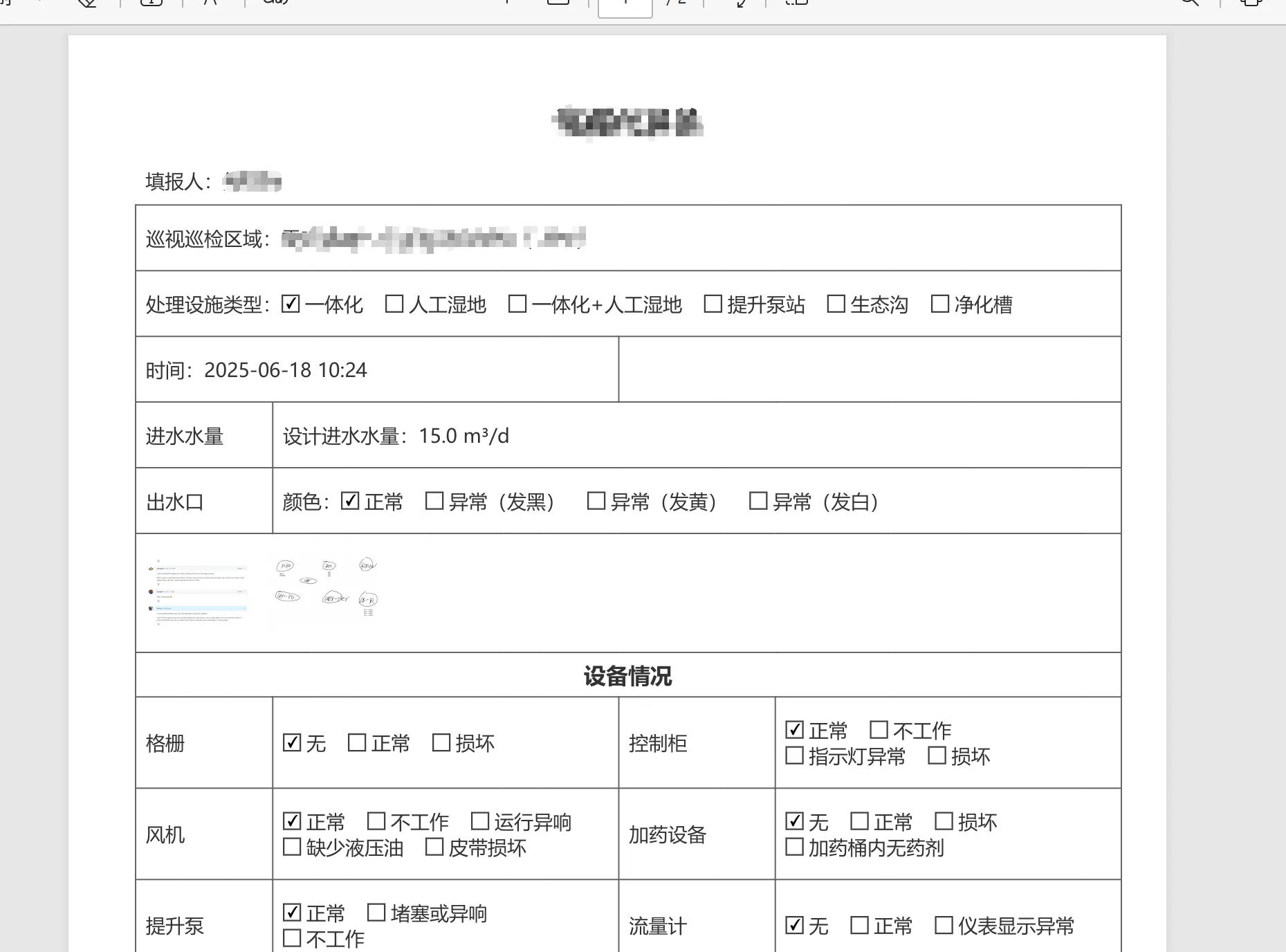
这里简单提取一些简单的 html 结构示例及样式吧,以便大家可以直接根据现有业务自行修改使用
<!DOCTYPE html>
<html xmlns:th="http://www.thymeleaf.org">
<head>
<style>
table,
div,
span {
font-size: 14px;
color: #333333;
}
table {
width: 100%;
display: table;
border-collapse: collapse;
}
table tbody td,
table tbody th {
padding: 14px 7px;
border: 1px solid #666;
}
table caption {
margin: 0;
padding: 0;
text-align: center;
caption-side: top;
}
table tbody th {
font-weight: normal;
text-align: left;
}
th .label {
width: 100%;
white-space: nowrap;
text-align: left;
}
input[type="checkbox"] {
margin: 0;
padding: 0;
}
.flex {
display: flex;
}
.items-center {
align-items: center;
}
.flex-wrap {
flex-wrap: wrap;
}
.whitespace-nowrap {
white-space: nowrap;
}
.pl-1 {
padding-left: 4px;
}
.pr-4 {
padding-right: 16px;
}
.py-2 {
padding-top: 8px;
padding-bottom: 8px;
}
.mr-2 {
margin-right: 8px;
}
.font-bold {
font-weight: bold;
}
</style>
</head>
<body>
<table>
<caption>
<h2 class="font-bold" style="margin:0 0 12px 0">xx填报单</h2>
</caption>
<!-- 24 列,24 列在占格布局上更为灵活,可以应对大部分的行布局 -->
<colgroup>
<th:block th:each="i : ${#numbers.sequence(1, 24)}">
<col th:width="${#numbers.formatDecimal(100/24, 1, 2) + '%'}" />
</th:block>
</colgroup>
<tbody>
<!-- 填报人 -->
<tr>
<td
colspan="24"
style="border: none;"
class="py-2"
th:text="'填报人:' + ${record.username}"
></td>
</tr>
<!-- 巡视区域 -->
<tr>
<td colspan="24" th:text="'巡视巡检区域:' + ${record.fullname}"></td>
</tr>
<!-- 设施类型 -->
<tr>
<td colspan="24">
<div class="flex items-center">
<div class="whitespace-nowrap">处理设施类型:</div>
<div class="flex flex-wrap">
<div
class="flex items-center"
th:each="opt : ${#strings.arraySplit('一体化,人工湿地,一体化+人工湿地,提升泵站,生态沟,净化槽', ',')}"
>
<input
type="checkbox"
th:checked="${record.facilityType == opt}"
readonly
/>
<span class="pr-4 pl-1" th:text="${opt}"></span>
</div>
</div>
</div>
</td>
</tr>
<!-- 时间 -->
<tr>
<td colspan="12" th:text="'时间:' + ${createFormatTime}"></td>
<td colspan="12"> </td>
</tr>
<!-- 动态内容 -->
<tr th:if="${record.facilityType == '提升泵站'}">
<td
colspan="24"
th:text="'提升泵站提升水量:' + ${record.waterIntake} + ' m³/h'"
></td>
</tr>
<th:block th:unless="${record.facilityType == '提升泵站'}">
<tr>
<th colspan="3">
<div class="label">进水水量</div>
</th>
<td
colspan="21"
th:text="'设计进水水量:' + ${record.waterIntake} + ' m³/d'"
></td>
</tr>
<tr>
<th colspan="3">
<div class="label">出水口</div>
</th>
<td colspan="21">
<div class="flex items-center">
<div class="whitespace-nowrap">颜色:</div>
<div
class="flex flex-wrap items-center"
th:each="opt : ${#strings.arraySplit('正常,异常(发黑),异常(发黄),异常(发白)',',')}"
>
<input
type="checkbox"
th:checked="${record.waterOutlet == opt}"
readonly
/>
<span class="pr-4 pl-1" th:text="${opt}"></span>
</div>
</div>
</td>
</tr>
</th:block>
<!-- 图片 -->
<tr>
<th colspan="3">
<div class="label">图片</div>
</th>
<td colspan="21">
<th:block th:if="${record.imgUrl}">
<img
th:each="url : ${#strings.arraySplit(record.imgUrl, ',')}"
th:src="${url}"
width="80"
class="mr-2"
/>
</th:block>
</td>
</tr>
</tbody>
</table>
</body>
</html>批量打印 PDF 并返回 zip 流
到这里只需要调用上边的工具类即可,注意:这里不太好设置 zip 的 Content-Length,因为 zip 的大小不固定,如果为了这个数值再去读一次 zip 的大小,有点得不偿失了。
    public void exportTestPdf(List<String> ids, HttpServletResponse response) {
        final String ZIP_NAME = "my-test.zip";

        response.setContentType("application/zip");
        response.setCharacterEncoding("UTF-8");
        response.setHeader("Content-Disposition",
                "attachment; filename=\"" + URLEncoder.encode(ZIP_NAME, StandardCharsets.UTF_8) + "\"");

        if (ids == null || ids.isEmpty()) return;

        try {
            ThymeleafRenderer thymeleafRenderer = new ThymeleafRenderer();

            // 伪代码,根据实际业务处理
            List<MyList> myList = myListService.getBatchListByIds(ids);

            try (ZipOutputStream zos = new ZipOutputStream(response.getOutputStream())) {
                for (MyList my : myList) {
                    String fileName = my.getId() + ".pdf";

                    // 传递给 Thymeleaf 的参数(伪代码)
                    Map<String, Object> map = new HashMap<>();
                    map.put("data", my);

                    // 指定 thymeleaf 的模板并渲染为 html
                    String htmlContent = thymeleafRenderer.render("my-test", map);
                    byte[] pdfBytes = PdfExportUtil.convertHtmlToPdfByte(htmlContent);

                    // 添加PDF到ZIP
                    ZipEntry entry = new ZipEntry(fileName);
                    zos.putNextEntry(entry);
                    zos.write(pdfBytes);
                    zos.closeEntry();
                }
                zos.finish();
            }
        } catch (Exception e) {
            throw new RuntimeException(e);
        }
    }
前端接收流文件并保存
流格式的文件保存做不到浏览器的下载一样的显示,因此只能从体验的角度来告知使用者,文件正在下载
可以使用 axios 的 onDownloadProgress 来获取已下载的文件大小,并展示给用户,这样在大文件导出时,不至于什么变化都没有,让使用者干等
const res = await axios.post(
  '/pdf-export/xxx',
  { ids: [] /** 导出的数据 id 集合 */ },
  {
    headers: {
      responseType: 'blob', // 用 blob 接收数据流
    },
    onDownloadProgress(progressEvent) {
      // 可以在此处获取已经下载的文件大小,并展示给用户,下载的进度百分比能不做就不做,浪费导出时间
      console.log('已下载大小', progressEvent.loaded);
    },
  },
);

const blob = new Blob([res.data],{type: 'application/zip'});

const href = window.URL.createObjectURL(blob);
const a = document.createElement('a');
a.style.display = 'none';
a.href = href;
a.download = `${Date.now().toString()}.zip`;
a.rel = 'noopener noreferrer';
document.body.append(a);
a.click();
URL.revokeObjectURL(a.href);
a.remove();